A Simple Routine for Keeping Track of Car Maintenance
Compare a glovebox log, a phone-based system, and a hybrid routine to find an easy way to keep service notes, reminders, and questions together.
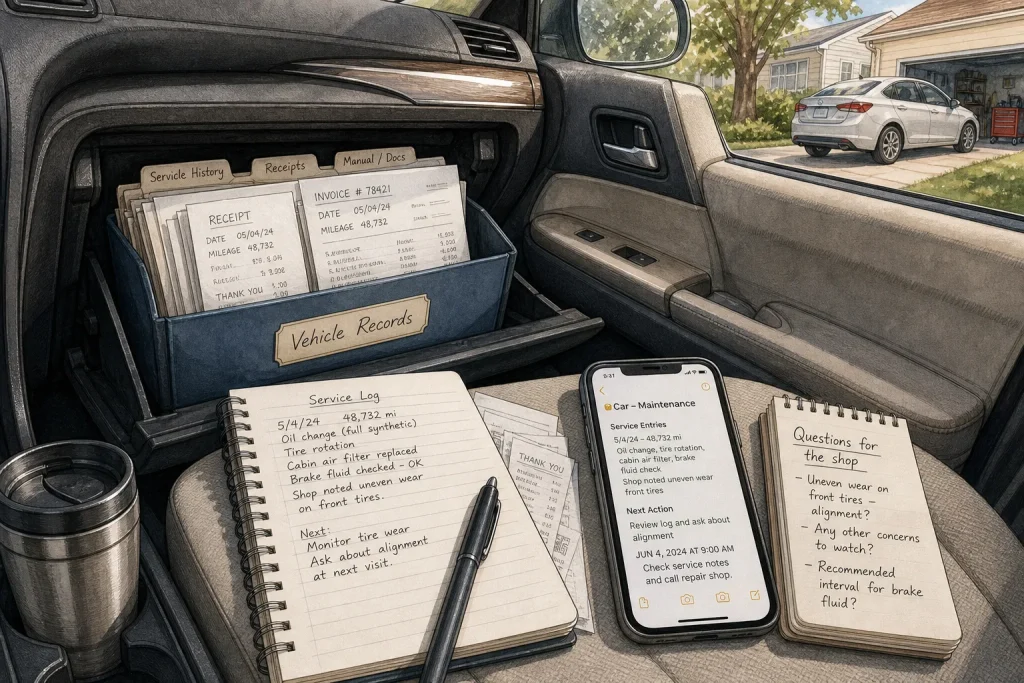
The receipt from your last oil change is folded beneath the registration papers, while a note about a rattling sound sits in your phone beside a grocery list. When the next service appointment arrives, it can be hard to remember what was done, what is due, or what you wanted the mechanic to check. A small, repeatable record-keeping routine can bring those details together without turning car care into a second job.
There are three useful approaches: a paper log kept in the car, a digital record on your phone, or a hybrid system that uses both. Each can work well. The right choice depends less on the car than on where you naturally look when you need a reminder.
Choose a paper log if you like having records in the car
A slim notebook or a few printed pages in a folder can make maintenance information easy to find during a visit to a repair shop. You can write down the date, odometer reading, work completed, parts or fluids mentioned, and any follow-up advice. Keep receipts in the same folder, in date order, and note which receipt belongs to which entry.
This approach suits drivers who prefer handwriting, share a vehicle with family members, or do not want maintenance notes mixed into their phones. It is also handy when you are speaking with a service adviser: the folder is right there, and you can point to an earlier repair or a recurring concern.
Paper has limits. A notebook left in a damp trunk can become damaged, and it will not remind you that an appointment is coming up. Put it somewhere protected, such as the glovebox or a document pouch, and pair it with a simple calendar alert if you tend to forget dates.
Keep entries brief and factual. “Tire rotation completed; shop noted uneven wear on front tires” is more useful than “car looked at.” If you do not know a technical term, write down the wording from the invoice rather than trying to interpret it later.
Choose a digital log if reminders matter most
A notes app, calendar, or spreadsheet can keep service details searchable and send reminders when you choose. A single note titled with the car’s make and model might hold entries under dates. A spreadsheet can add columns for the odometer reading, work, shop, receipt location, and next recommended action. Use whatever tool you already open regularly; a sophisticated template is of little help if you forget where it is.
Digital records suit people who keep their phones close, manage more than one vehicle, or want to search for a repair by name. They also make it convenient to attach a photo of an invoice or a dashboard message. Before saving personal information, consider who can access the device or shared account, and avoid storing details that are not needed for maintenance.
Reminders need careful wording. Instead of a vague alert called “car,” use a label such as “Check service notes and call repair shop.” If the owner’s manual or a qualified technician gives a time- or mileage-based recommendation, record the source and set a reminder that helps you review it. The reminder is a prompt to check, not a substitute for the vehicle’s maintenance schedule or professional advice.
A phone system can become cluttered if every small thought gets its own alert. Keep one running “questions for the shop” note, then move unresolved items into the appointment reminder when a visit is arranged. After the appointment, mark each question as answered, deferred, or still needing follow-up.
Choose a hybrid if you want both a backup and a prompt
A hybrid routine keeps the durable record in one place and uses the other format for the next action. For example, you might keep invoices and a concise service log in a glovebox folder while using a calendar to remind you to review the log or book an appointment. Or you might store the main record digitally and keep a small paper card with the current service contact and urgent notes in the car.
This suits drivers who like paper at the repair counter but rely on a phone to remember dates. It also helps when several people use the same car: the folder can show what happened, while a shared calendar can flag what needs attention. The tradeoff is a little duplication. Keep it limited to essentials, and choose one record as the source of truth so the two versions do not drift apart.
For instance, if the paper folder is your main log, write full service details there and put only the next review date in the calendar. If the digital note is primary, keep paper receipts as supporting documents and add a short note pointing to the digital record.
Use the same short routine after every service visit
Consistency matters more than the format. After a visit, take a few minutes to record what was done and capture any advice before the invoice disappears into a bag or glovebox. Then review the next action and make a reminder only if one is useful. A simple entry can include:
- Date and odometer reading: Copy them from the invoice or vehicle display.
- Work completed: Name the service or repair in plain language, using the invoice wording where helpful.
- Parts, fluids, or concerns noted: Record only what the shop documented or explained.
- Questions left open: Write what you still need clarified, and who should answer it.
- Next action: Note whether you need to book, monitor a concern, or consult the owner’s manual or a qualified technician.
- Receipt location: Identify the folder, app, or other place where the supporting document is kept.
Check the owner’s manual for the vehicle’s maintenance schedule, since requirements can vary by model and driving conditions. If advice from a shop conflicts with the manual, or a warning or unusual symptom concerns you, ask the service professional to explain the recommendation. Your log helps you ask clear questions; it is not a diagnosis.
Hypothetical worked example: one folder and one calendar
Imagine a household with one shared car, a paper receipt from a recent service visit, and a recurring reminder on a phone that simply says “car stuff.” The drivers decide that the glovebox folder will be the main record and the shared calendar will hold only prompts.
They copy the visit date and odometer reading from the receipt, summarize the work in the notebook, and file the invoice behind that entry. The invoice also mentions a concern that should be discussed at the next visit. They add that wording to a “questions for the shop” page and replace the vague calendar alert with “Review car log and ask about noted concern.” At the next appointment, they can bring the folder and ask a specific question. The expected result is a clearer handoff between drivers and the repair shop, with a small amount of duplication as the tradeoff.
Pick the approach you will actually maintain
Choose paper if you want records close to the car and enjoy writing things down. Choose digital if search and reminders are your main needs. Choose hybrid if you want a physical history but depend on a phone to prompt the next action.
Whichever you choose, start with the latest service invoice rather than trying to reconstruct the car’s entire history from memory. Add new information after each visit, keep unresolved questions visible, and review the record before booking work. A tidy, honest log is useful even when it is incomplete: it can show what you know, what you still need to ask, and where the supporting paperwork lives.
Keep exploring

Why Cars Become Part of a Neighborhood’s Identity
A neighborhood’s relationship with driving grows from ordinary routines: where people park, what they carry, and…
What Your Car’s Dashboard Symbols Are Trying to Tell You
When an unfamiliar light appears, put safe driving first, then use the exact vehicle manual and…